CDAC Prep Card

Generate a CDAC filling sheet before you open the official form.

This tool turns your hotel address, arrival details, and exit proof into a filling sheet you can copy into the official CDAC portal, plus a small fallback card for the airport or hotel desk. It does not submit anything, store anything, or replace the official form.

Needs prep

Use this when filling the official CDAC form. Copy values field-by-field; do not upload this to third-party CDAC services.

Airport fallback card

Show this if your hotel address needs manual confirmation at the airport, taxi stand, or hotel desk.

Please help me confirm this address.请帮我确认这个地址。
First-night hotel[missing]
Address to use in China[missing]
Hotel phone[missing]
Cities I plan to visit[missing]
Departure proof I carry[missing]

No passport number is included. Keep it with your hotel booking and exit ticket.

Official CDAC portal

Readiness issues

  • Arrival port
  • Arrival flight or train
  • First-night hotel
  • Chinese address
  • Hotel phone
  • Planned cities
  • Exit ticket

High friction risk

  • High friction risk: the CDAC address, taxi address, and hotel check-in address may not match.
  • High friction risk: 240h transit travelers should keep confirmed onward proof ready.
  • Missing arrival flight or train details can slow down the form and airport fallback.
  • Hotel phone is useful if the address or late check-in needs manual confirmation.

Official portal

The card is free. Do not pay anyone.

The official desktop portal is s.nia.gov.cn/ArrivalCardFillingPC. The mobile path is /ArrivalCardFillingPhone, and the same service is also available through the WeChat / Alipay "arrival card" mini-program. Fill it within 72 hours before arrival, copy values from the prep sheet above, and screenshot the QR or barcode after submit.

What the official portal actually looks like

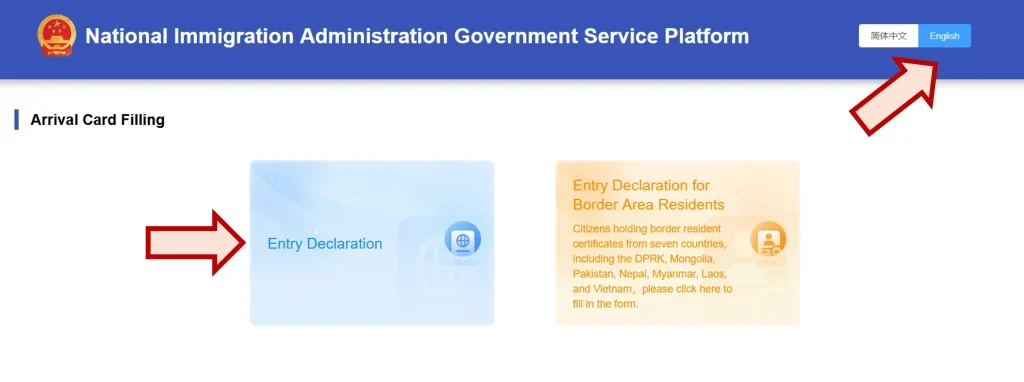
Screenshots below show the four screens you'll actually see on s.nia.gov.cn: the landing page, then Steps 2 / 3 / 4 of the form. They're here so you know what you should see — and what scam sites get wrong.

CDAC landing page on s.nia.gov.cn — National Immigration Administration Government Service Platform header with Arrival Card Filling section showing Entry Declaration and Entry Declaration for Border Area Residents cards. Annotations point to the English language toggle and the Entry Declaration card.

Landing page · s.nia.gov.cn/ArrivalCardFillingPC

The official portal shows the National Immigration Administration logo (red emblem), the title "National Immigration Administration Government Service Platform", a 简体中文 / English language toggle in the top right, and two cards:

  • Entry Declaration — what most 240h travelers click.
  • Entry Declaration for Border Area Residents — only for citizens of DPRK, Mongolia, Pakistan, Nepal, Myanmar, Laos, and Vietnam holding border-resident certificates.

What scam sites do differently: different logo, different title, or any kind of fee prompt before you even start. The official site does not charge.
Before Step 1 — two click-throughs

  1. Instructions / agreement screen. After clicking "Entry Declaration" you see a list of 8 groups exempt from filling (permanent residents, HK/Macau residents on Travel Permit, 24-hour airside transit, group-visa tours, foreign crew, return-cruise passengers, courteous-treatment recipients, E-channel travelers). Key clause II confirms 24-hour and 240-hour transit travelers do use this system. Click I AGREE to continue. (Scam-site tell: real or missing exemption list, no I AGREE gate.)
  2. Step 1 · Upload ID Document Page. Two fields: Type of ID Document (dropdown, default "Ordinary Passport"), and an Upload box — tap "+" to take a photo (mobile) or upload a file (desktop) of your passport's data page. NIA shows a small reference photo for correct framing. Click Next. OCR runs automatically, then the form loads with most of Step 2 pre-filled.
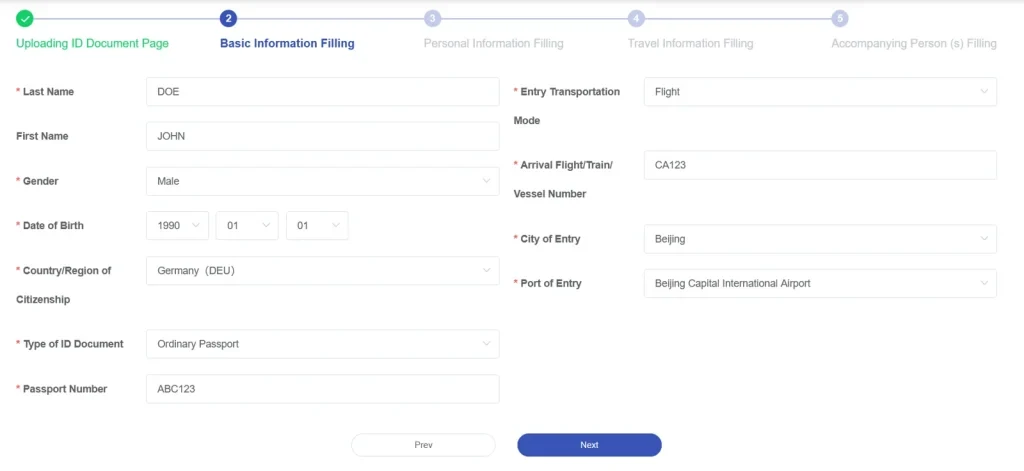
CDAC step 2 — Basic Information Filling page with Last Name, First Name, Gender, Date of Birth, Country of Citizenship, Type of ID Document, Passport Number, Entry Transportation Mode, Arrival Flight Number, City of Entry, Port of Entry

Step 2 of 5 · Basic Information Filling

OCR pre-fills most of this. Your job here is to verify, not retype. The fields on the left come from your passport (Last/First Name, Gender, DOB, Citizenship, Passport Number); the fields on the right are your flight (Entry Transportation Mode, Arrival Flight/Train/Vessel Number, City of Entry, Port of Entry).

Where mistakes happen: OCR commonly confuses O vs 0, I vs 1 vs l, and B vs 8 in the passport number. Open your passport next to the screen and check character-by-character. A wrong passport number here means your card won't match at immigration.

Field deep-dive · Step 2

Arrival Flight/Train/Vessel Number — what to fill

The Arrival Flight/Train/Vessel Number is the single field on the CDAC that links your declaration to your actual inbound trip into mainland China. It sits on the right side of Step 2 below "Entry Transportation Mode". OCR does not pre-fill this — you type it yourself.

What to enter, by transport mode:

  • Air (Entry Transportation Mode = Aircraft): the IATA flight number printed on your boarding pass — for example MU585 (China Eastern SFO→PVG), CA985 (Air China LAX→PEK), or CX260 (Cathay HKG→PVG). No spaces, no leading zeros. If your itinerary has multiple legs, use the last leg that actually lands in mainland China — not the original departure flight from your home country.
  • Rail (Entry Transportation Mode = Train): the China Railway train code — for example G99 (Hong Kong West Kowloon → Beijing), D27, or Z180. The letter prefix is part of the number; do not omit it.
  • Sea (Entry Transportation Mode = Vessel): the ship name and voyage number if your ticket shows one — for example MS Diamond Princess voyage 2510 or Cosco Star CS-118. Cruise itineraries usually print this on the boarding ticket; if it isn't there, write the vessel name alone.

Common mistakes to avoid:

  • Using your booking reference (PNR) instead of the flight number — the PNR is a 6-character alphanumeric code (e.g., ABC123) and does not belong here.
  • Entering the codeshare partner's number when the operating carrier is different — always use the operating carrier's flight number from the boarding pass.
  • For air travel: filling the flight from your home country when you actually transit through a third hub (e.g., Doha). Fill only the final inbound segment that lands in mainland China.
  • Mixing letters and digits incorrectly: G99 is not the same as G099 — type exactly what the carrier prints.

If the field does not match the manifest the airline/rail operator transmits to immigration, your CDAC may be flagged for review at arrival, even though the rest is correct. Open your ticket next to the screen and type character-by-character.

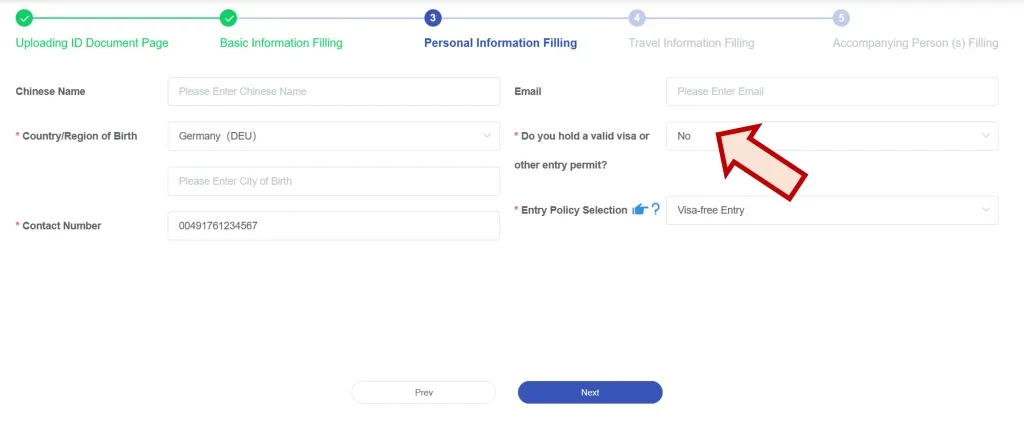
CDAC step 3 — Personal Information Filling with Chinese Name, Country of Birth, City of Birth, Contact Number, Email, valid visa question, Entry Policy Selection dropdown

Step 3 of 5 · Personal Information Filling

Most fields are self-explanatory. Two things that trip up 240h travelers:

  • Do you hold a valid visa or other entry permit? — Answer No for 240h visa-free transit. A "Yes" implies you have a regular tourist/business visa, which the system will then ask you to enter.
  • Entry Policy Selection — Pick "Visa-free Entry" (or the localized equivalent that lists 24/240-hour transit). This is the field that flags you as a transit traveler in NIA's system.

Chinese Name is optional unless you have one on official ID. Contact Number can be your home country number with country code — it just needs to reach you.

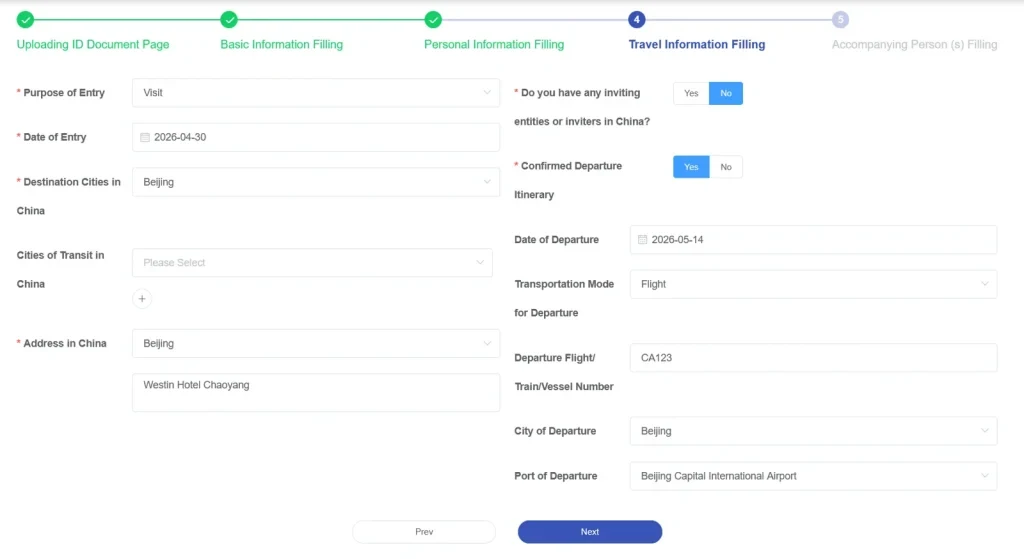
CDAC step 4 — Travel Information Filling with Purpose of Entry, Date of Entry, Destination Cities in China, Cities of Transit in China, Address in China, departure flight info

Step 4 of 5 · Travel Information Filling

The biggest section. 240h-specific notes:

  • Purpose of Entry — "Visit" or "Tourism" works for 240h.
  • Destination Cities — list every city you'll sleep in. If you only fill the entry city, customs may ask why your hotel address is somewhere else.
  • Address in China — must be your actual hotel/host address, written in Latin script the same way the hotel booking shows it. Pinyin alone often fails Chinese address-validation. If the hotel address is unclear, use the first-night address guide before submitting.
  • Confirmed Departure Itinerary: Yes, plus the exit flight number, date, and port. This is the field that proves you'll leave within 240h. No exit ticket = no 240h.

Field deep-dive · Step 4

Confirmed Departure Itinerary on the China Arrival Card

For 240-hour transit travelers, the Confirmed Departure Itinerary question on Step 4 is the single most important field — it proves you'll leave mainland China within 240 hours, which is the entire basis of your visa-free entry. Get this wrong and you can be denied boarding by the airline before you ever reach immigration.

What "confirmed" means in NIA's eyes: a ticketed onward journey to a country or region different from the one you arrived from, with a fixed seat/cabin and a date that falls inside your 240-hour window. It is not the same as a refundable booking, a "hold" reservation, or a one-way placeholder you intend to change. The departure must be on a real ticket the airline or rail operator can verify.

How to fill the form:

  • Confirmed Departure Itinerary: Yes — never select No if you're on 240h transit.
  • Exit Transportation Mode — Aircraft, Train, or Vessel, matching how you'll leave.
  • Exit Flight/Train/Vessel Number + date + port — the same format rules as the arrival field (see Arrival Flight/Train/Vessel Number above). Use the operating carrier's number, no PNR, no codeshare.
  • Destination country/region — must be different from where you flew in from. A→China→A round trips do not qualify for 240h transit.

If automated systems can't see your onward ticket (separate bookings, different airline alliance, recently booked), bring backup evidence to the airline counter and to immigration:

  • Printed e-ticket PDF with passenger name, route, date, and operating carrier visible.
  • Booking confirmation email screenshot showing the airline's booking reference (PNR).
  • For rail: the China Railway 12306 e-ticket or operator booking with seat assigned.
  • For sea: the cruise line's pre-printed boarding pass or pier check-in voucher.

This summary covers the 240h case. For the full decision rules — including what visa holders and ordinary visa-free travelers without a booked exit should select — read the dedicated Confirmed Departure Itinerary guide. See also the denied-boarding guide for what happens when an airline check-in agent cannot verify your onward ticket — and how to recover.

Step 5 + final submit

Step 5 · Accompanying Person — anyone traveling on the same passport (usually only minor children). Leave blank if you're solo.

Final review & submit — sign the declaration, confirm, and the system generates a QR code / barcode receipt. Screenshot it immediately. Print if possible. Show it at immigration when asked.

You cannot edit after submitting. Review every field before pressing the final submit button. If you spot an error post-submit, your only fix is to submit a brand new card.

Common OCR mistakes to fix before submit

  • O vs 0 — passport letters in OCR often misread the letter O as zero.
  • I vs 1 vs l — capital I, digit 1, and lowercase L look identical.
  • B vs 8 — especially in machine-readable zones.
  • Name order — the system uses surname / given names. Western "first name last name" can flip incorrectly.
  • Birth date format — YYYY-MM-DD vs MM/DD/YYYY can swap day and month.

How to spot a scam CDAC site

NIA has issued multiple warnings about third-party sites that charge fees for the free arrival card service. They will charge you and may produce invalid QR codes that fail at immigration. NIA does not publish a specific blocklist — instead, watch for these patterns:

  • any domain ending in .com/.net/.org/.app (the only safe TLD is .gov.cn)
  • any site asking for a fee — the official service is 100% free
  • any site with 'china-arrival', 'china-entry-card', 'cn-immigration' style names that is not nia.gov.cn
  • any third-party that asks you to upload your passport image before redirecting to the official portal
  • any site that promises 'expedited processing' or 'guaranteed approval'
  • any site arrived at via paid Google ads claiming to be the official CDAC service

The single safe rule: the official URL ends in .nia.gov.cn. If the URL you're looking at is anything else — including .com, .net, .org, or.app — close the tab and go to s.nia.gov.cn directly. The official service is always free.

Sources: China National Immigration Administration — Online Arrival Card Filling Service (link) · Official CDAC filing portal (the only safe site) (link) · Policy snapshot 2026-05-18. Screenshots adapted from egg-and-banana.com CDAC guide — used here as illustrative form templates with placeholder data (DOE/JOHN/CA123 etc.), not real submissions. We did not capture or store any real traveler data. This page is informational only. We do not collect, submit, or store your CDAC data. See our disclaimer.