CDAC 준비 카드

공식 입국 카드를 열기 전에 입력할 정보를 준비하세요.

CDAC 정보, 호텔 주소, 출국 증빙을 하나의 로컬 체크리스트로 정리합니다. 제출하거나 저장하지 않으며 공식 양식을 대신하지 않습니다.

준비 필요

Use this when filling the official CDAC form. Copy values field-by-field; do not upload this to third-party CDAC services.

Airport fallback card

Show this if your hotel address needs manual confirmation at the airport, taxi stand, or hotel desk.

Please help me confirm this address.请帮我确认这个地址。
First-night hotel[누락]
Address to use in China[누락]
Hotel phone[누락]
Cities I plan to visit[누락]
Departure proof I carry[누락]

No passport number is included. Keep it with your hotel booking and exit ticket.

공식 CDAC 포털

Readiness issues

  • 도착 항구
  • 도착 항공편 또는 열차
  • 첫날 밤 호텔
  • 중국어 주소
  • 호텔 전화번호
  • 방문 예정 도시
  • 출국 티켓

막힐 가능성이 높은 부분

  • 막힐 가능성이 높은 부분: CDAC 주소, 택시 주소, 호텔 체크인 주소가 서로 다를 수 있습니다.
  • 막힐 가능성이 높은 부분: 240시간 환승 여행자는 확정된 출국 증빙을 준비해야 합니다.
  • 도착 항공편 또는 열차 정보가 없으면 양식 작성과 공항 대체 절차가 늦어질 수 있습니다.
  • 주소 확인이나 늦은 체크인 시 호텔 전화번호가 유용합니다.

Official portal

The card is free. Do not pay anyone.

The official desktop portal is s.nia.gov.cn/ArrivalCardFillingPC. The mobile path is /ArrivalCardFillingPhone, and the same service is also available through the WeChat / Alipay "arrival card" mini-program. Fill it within 72 hours before arrival, copy values from the prep sheet above, and screenshot the QR or barcode after submit.

공식 포털 실제 화면

아래 스크린샷은 s.nia.gov.cn에서 실제로 보게 되는 화면입니다. 가짜 사이트와 비교할 수 있습니다.

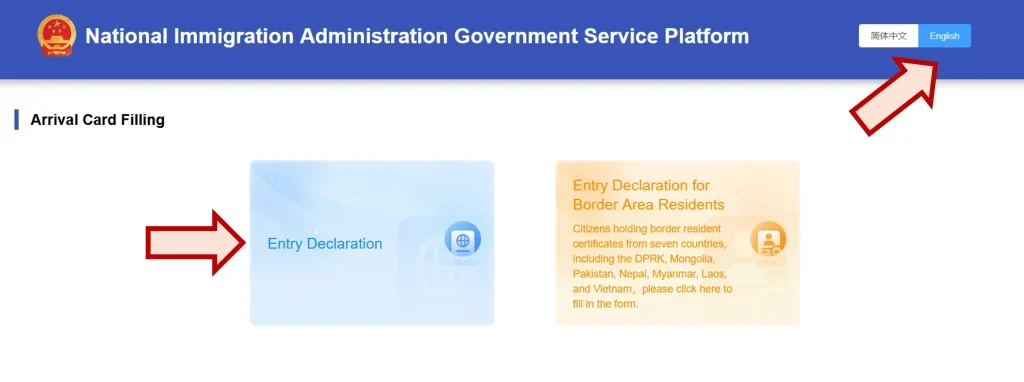
CDAC landing page on s.nia.gov.cn — National Immigration Administration Government Service Platform header with Arrival Card Filling section showing Entry Declaration and Entry Declaration for Border Area Residents cards. Annotations point to the English language toggle and the Entry Declaration card.

Landing page · s.nia.gov.cn/ArrivalCardFillingPC

The official portal shows the National Immigration Administration logo (red emblem), the title "National Immigration Administration Government Service Platform", a 简体中文 / English language toggle in the top right, and two cards:

  • Entry Declaration — what most 240h travelers click.
  • Entry Declaration for Border Area Residents — only for citizens of DPRK, Mongolia, Pakistan, Nepal, Myanmar, Laos, and Vietnam holding border-resident certificates.

What scam sites do differently: different logo, different title, or any kind of fee prompt before you even start. The official site does not charge.

Before Step 1 — two click-throughs

  1. Instructions / agreement screen. After clicking "Entry Declaration" you see a list of 8 groups exempt from filling (permanent residents, HK/Macau residents on Travel Permit, 24-hour airside transit, group-visa tours, foreign crew, return-cruise passengers, courteous-treatment recipients, E-channel travelers). Key clause II confirms 24-hour and 240-hour transit travelers do use this system. Click I AGREE to continue. (Scam-site tell: real or missing exemption list, no I AGREE gate.)
  2. Step 1 · Upload ID Document Page. Two fields: Type of ID Document (dropdown, default "Ordinary Passport"), and an Upload box — tap "+" to take a photo (mobile) or upload a file (desktop) of your passport's data page. NIA shows a small reference photo for correct framing. Click Next. OCR runs automatically, then the form loads with most of Step 2 pre-filled.
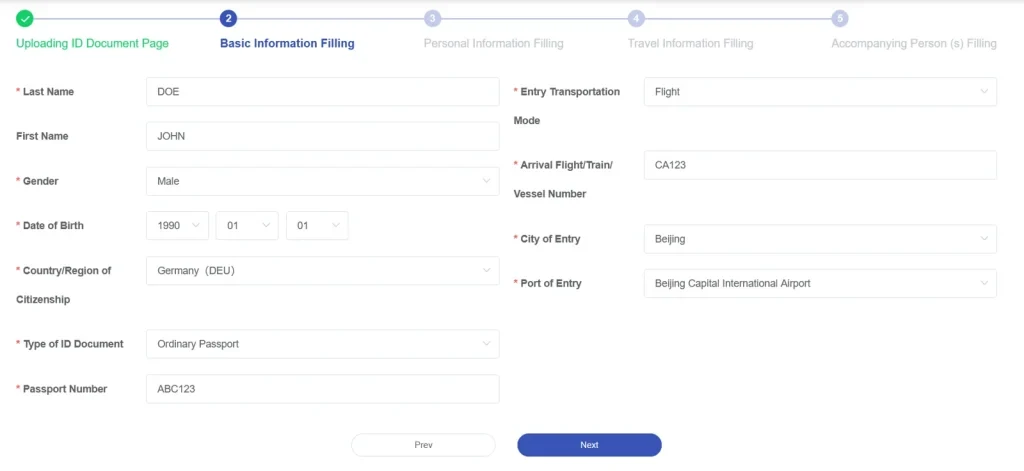
CDAC step 2 — Basic Information Filling page with Last Name, First Name, Gender, Date of Birth, Country of Citizenship, Type of ID Document, Passport Number, Entry Transportation Mode, Arrival Flight Number, City of Entry, Port of Entry

Step 2 of 5 · Basic Information Filling

OCR pre-fills most of this. Your job here is to verify, not retype. The fields on the left come from your passport (Last/First Name, Gender, DOB, Citizenship, Passport Number); the fields on the right are your flight (Entry Transportation Mode, Arrival Flight/Train/Vessel Number, City of Entry, Port of Entry).

Where mistakes happen: OCR commonly confuses O vs 0, I vs 1 vs l, and B vs 8 in the passport number. Open your passport next to the screen and check character-by-character. A wrong passport number here means your card won't match at immigration.

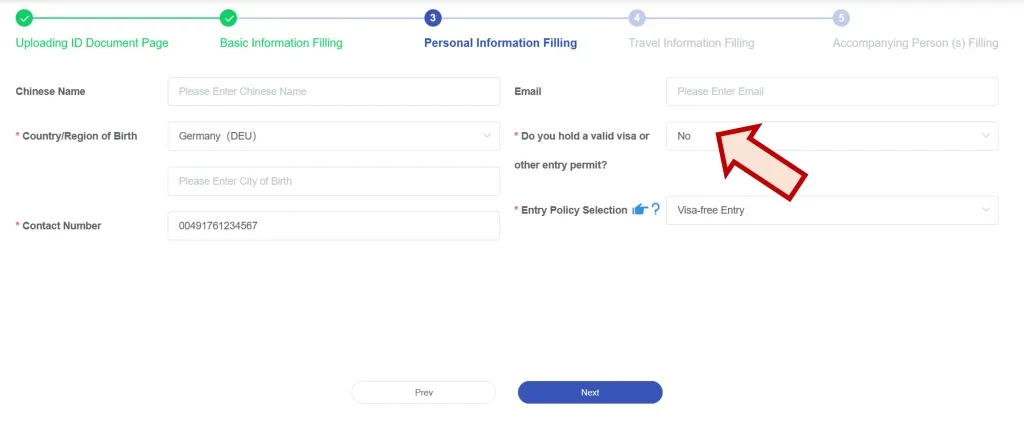
CDAC step 3 — Personal Information Filling with Chinese Name, Country of Birth, City of Birth, Contact Number, Email, valid visa question, Entry Policy Selection dropdown

Step 3 of 5 · Personal Information Filling

Most fields are self-explanatory. Two things that trip up 240h travelers:

  • Do you hold a valid visa or other entry permit? — Answer No for 240h visa-free transit. A "Yes" implies you have a regular tourist/business visa, which the system will then ask you to enter.
  • Entry Policy Selection — Pick "Visa-free Entry" (or the localized equivalent that lists 24/240-hour transit). This is the field that flags you as a transit traveler in NIA's system.

Chinese Name is optional unless you have one on official ID. Contact Number can be your home country number with country code — it just needs to reach you.

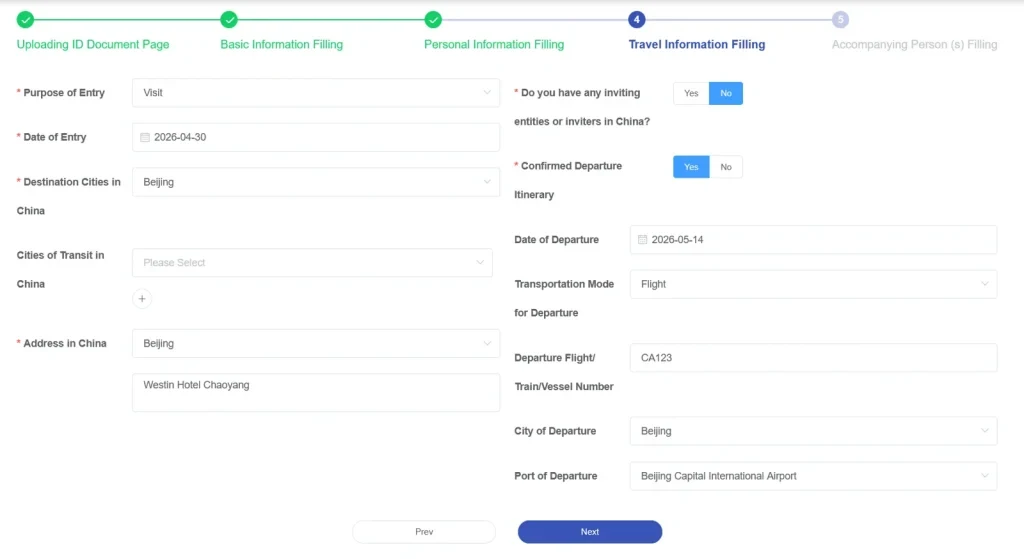
CDAC step 4 — Travel Information Filling with Purpose of Entry, Date of Entry, Destination Cities in China, Cities of Transit in China, Address in China, departure flight info

Step 4 of 5 · Travel Information Filling

The biggest section. 240h-specific notes:

  • Purpose of Entry — "Visit" or "Tourism" works for 240h.
  • Destination Cities — list every city you'll sleep in. If you only fill the entry city, customs may ask why your hotel address is somewhere else.
  • Address in China — must be your actual hotel/host address, written in Latin script the same way the hotel booking shows it. Pinyin alone often fails Chinese address-validation. If the hotel address is unclear, use the first-night address guide before submitting.
  • Confirmed Departure Itinerary: Yes, plus the exit flight number, date, and port. This is the field that proves you'll leave within 240h. No exit ticket = no 240h.

Step 5 + final submit

Step 5 · Accompanying Person — anyone traveling on the same passport (usually only minor children). Leave blank if you're solo.

Final review & submit — sign the declaration, confirm, and the system generates a QR code / barcode receipt. Screenshot it immediately. Print if possible. Show it at immigration when asked.

You cannot edit after submitting. Review every field before pressing the final submit button. If you spot an error post-submit, your only fix is to submit a brand new card.

Common OCR mistakes to fix before submit

  • O vs 0 — passport letters in OCR often misread the letter O as zero.
  • I vs 1 vs l — capital I, digit 1, and lowercase L look identical.
  • B vs 8 — especially in machine-readable zones.
  • Name order — the system uses surname / given names. Western "first name last name" can flip incorrectly.
  • Birth date format — YYYY-MM-DD vs MM/DD/YYYY can swap day and month.

How to spot a scam CDAC site

NIA has issued multiple warnings about third-party sites that charge fees for the free arrival card service. They will charge you and may produce invalid QR codes that fail at immigration. NIA does not publish a specific blocklist — instead, watch for these patterns:

  • any domain ending in .com/.net/.org/.app (the only safe TLD is .gov.cn)
  • any site asking for a fee — the official service is 100% free
  • any site with 'china-arrival', 'china-entry-card', 'cn-immigration' style names that is not nia.gov.cn
  • any third-party that asks you to upload your passport image before redirecting to the official portal
  • any site that promises 'expedited processing' or 'guaranteed approval'
  • any site arrived at via paid Google ads claiming to be the official CDAC service

The single safe rule: the official URL ends in .nia.gov.cn. If the URL you're looking at is anything else — including .com, .net, .org, or.app — close the tab and go to s.nia.gov.cn directly. The official service is always free.

Sources: China National Immigration Administration — Online Arrival Card Filling Service (link) · Official CDAC filing portal (the only safe site) (link) · Policy snapshot 2026-05-18. Screenshots adapted from egg-and-banana.com CDAC guide — used here as illustrative form templates with placeholder data (DOE/JOHN/CA123 etc.), not real submissions. We did not capture or store any real traveler data. This page is informational only. We do not collect, submit, or store your CDAC data. See our disclaimer.